投稿

ラベル(css)が付いた投稿を表示しています

Google Webフォントの使い方

イメージ
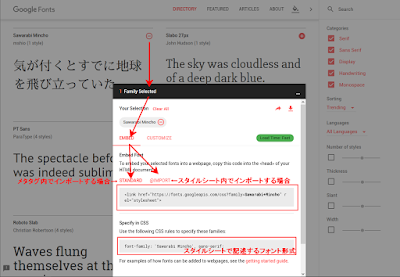
Google の無料Webフォントを使ったので、使い方をメモ https://fonts.google.com/ を開く 利用したいフォントを + で追加し、インポート部とスタイルシート部をそれぞれコピペ ※フォントは閲覧時に自動でインポート(ダウンロード)される

Google カレンダーの土日に色を付ける 2018版 (Chrome, Firefox + Stylus)

イメージ
Chrome or Firefox で、CSSをいじって(Stylus拡張を利用) 新しいGoogle カレンダーの土日に色を付ける 拡張機能  Stylus  で、下記のようにCSSを追加し、GoogleカレンダーのURL( https://calendar.google.com/ )を前方一致で設定する div[role="columnheader"]{ background-color :#eeeeee !important; } div[role="columnheader"]:nth-child(1), div[class="gGDF0e"] div:nth-child(1){ background-color :#ffeeee !important; } div[role="columnheader"]:nth-child(7), div[class="gGDF0e"] div:nth-child(7){ background-color :#eeeeff !important; } Chrome と Firefox の Stylusは互いにエクスポート・インポート可能です
IFTTTの一覧表示が大きすぎるので、CSSをいじって沢山並べる

イメージ
今回は Chrome の拡張 Stylus (Stylish)に ifttt.com 用の定義を用意して 記載したCSS li[class*="web-applet-card"]{     width: 10em;     padding: .1em; } ul[class*="web-applet-cards"]{     max-width: none; } 結果

Firefox アドオンの Stylish がついにアップデートされて Chromeと同じ仕様に

イメージ
Firefox アドオンの Stylish がついにアップデートされて Chromeと同じ仕様になった 閲覧サイトの送信問題とかいろいろあるわけですが 少し前から、Firefox版も URL同期が使えなくなり不便になっていましたが、結局 Chromeと不完全にもjson形式のエクスポートファイルが共通になりました で、不完全なのは Chromeでエクスポートしたファイルに ANSI以外を含む場合、Firefox側でインポートすると文字化けします また、Firefoxでエクスポートした際にファイル名が謎なのと、改行が殆ど無いエクスポートファイルになり、まだまだ不完全な感じが強いです

左寄せの div を中央に置く CSS

イメージ
左寄せの div をページ全体でセンタリングするスタイルシート /* CSS */ div.sotomi{ text-align: center; } div.nakami{ display: inline-block; text-align: left; } /* HTML */ <div class="sotomi" style="background-color:#eeeeff;"> <div class="nakami" style="background-color:#ffeeee;"> ほげほげ<br ⁄> ほげほげほげほげほげほげ<br ⁄> ほげほげ<br ⁄> </div> </div> 結果

Google カレンダーの土日に色を付ける(Chrome + Stylish or Stylus)

イメージ
2018年版は こちら Chrome ブラウザで、CSSをいじって Google カレンダーの土日に色を付ける 拡張機能 Stylish  または Stylus で、下記のようにCSSを追加し、GoogleカレンダーのURLを前方一致で設定する 【追記】 カレンダーのURLが変更になっています https:/www.google.com/calendar/ → https://calendar.google.com/calendar/ td:nth-child(1)[class*="st-dtitle"], td:nth-child(1)[class*="st-bg"]{ background-color :#ffeeee !important; } td:nth-child(7)[class*="st-dtitle"], td:nth-child(7)[class*="st-bg"]{ background-color :#eeeeff !important; }